


Updated July 23, 2026
Viewability is a KPI that is now considered table stakes for most media buyers and marketplaces. Media suppliers can improve viewability to reduce friction with advertisers and monetize a larger portion of their inventory, but the million-dollar question for most publishers at this stage is how? This guide was created to help publishers find the answer to that question.
Viewability is a quality metric that measures whether a digital ad has an opportunity to be seen by an average user. While the elements of viewability can vary depending on buyer priorities, they were standardized by the Interactive Advertising Bureau (IAB) and can change depending on the size and type of the ad. For instance, standard display ads must be 50% visible for one second, while video ads must be 50% visible for two consecutive seconds. For the purpose of this article, we will be sharing some visualized metrics that DV Publisher Suite users have available to measure and improve ad viewability.
Designing a Site for High Viewability
Publishers have a chance to start improving their ad viewability before a page even loads by designing and optimizing their site for viewable ad placements. Here are some tips to get started.
Measure and Analyze Ad Placement, Size and Layout
The way ads are placed on a web page and the size of the ad unit have a large impact on viewability, which is something that can be missed by high-level viewability percentages. For example, ad units typically perform better when placed just “above the fold” (or the bottom of the web page before the user scrolls down) rather than at the top of the page, as this positioning allows for the greatest visibility.
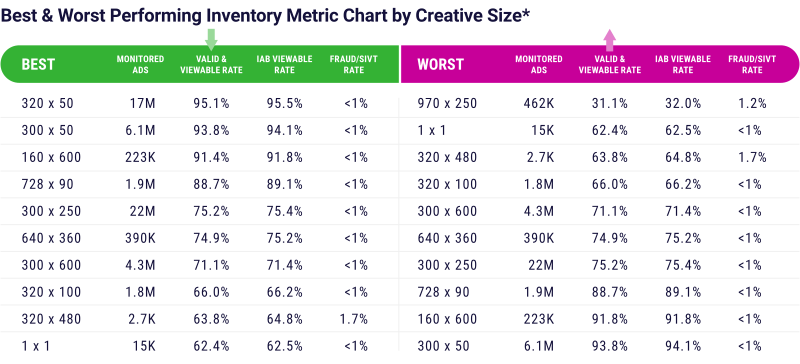
Ad unit size and layout also play a role. Vertical ad units are typically considered the most viewable as their layout allows them to stay in view as a user scrolls. In terms of sizing, there are specific ad units that are considered more viewable than others; in particular, the 728x90, 300x250, and 300x600, and vertical ad units like the 120x240, 240x600,and 160x600. Using this added layer of analysis, publishers can intentionally design their available ad inventory for maximum viewability.
Account for Mobile Devices
Mobile ads account for nearly three-quarters of total advertising budgets, and according to recent projections, spending worldwide is projected to reach $1.3 trillion by 2030. With a share of the market that large, publishers need to make sure that their inventory is optimized for mobile viewing.
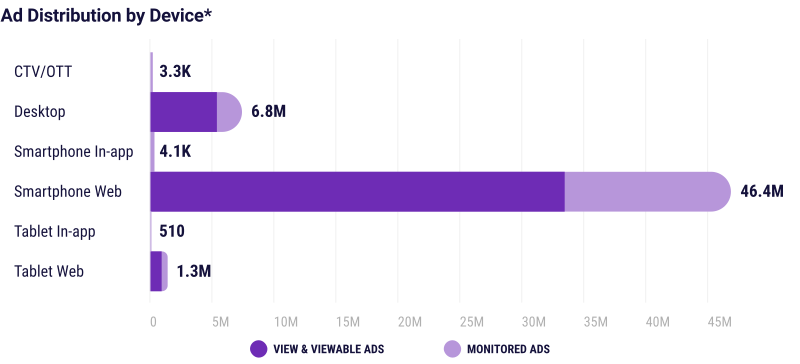
Publishers can choose to utilize responsive ad units, which aid performance by loading optimally sized ads for the screen displaying the ad. Placement also impacts viewability on mobile devices.
For example, publishers often find that a 320x100 unit size ad is best positioned above the fold, while a 300x250 ad unit below the fold can often meet viewability criteria and is also known to have high fill rates, as it is a preferred size among advertisers.
A/B Test Ad Layouts Frequently to Ensure Maximum Viewability
Publishers know that every bit of data helps unlock the full revenue potential of their inventory. A/B testing a combination of ad layout variants can help determine which layout and ad types perform the best. Publishers benefit from having this viewability data on hand, as it helps optimize performance while also proving the value of ad inventory. Plus, DV Publisher Suite makes it easy to A/B test various pockets of inventory by utilizing custom macros. Learn how here!
Investigate Lazy-Loading Ad Units
Lazy loading can be applied to specific ad units to ensure that ads load only when in the user’s viewpoint, meaning essentially that ads will only load when the viewer can see them. This aids in improving viewability by lowering the number of impressions served out of view.
By prioritizing elements that are in view, lazy loading can also work to increase page loading speed and conserve bandwidth. However, it should be noted that lazy loading isn’t a one-size-fits-all solution. Publishers should create a system around lazy-loading ads across websites, as users can be more engaged on some pages but tend to simply skim through others.
Minimize Excess Passbacks and Extra Calls to the Ad Server
Ads will load more slowly when ad calls are pinged from ad server to ad server through passbacks. Minimizing passbacks simply means reducing the number of ad calls made through the passback system, which subsequently increases page load speed. Reducing latency through reducing passbacks will lead to better viewability.
Optimizing for Page Speed and Responsiveness
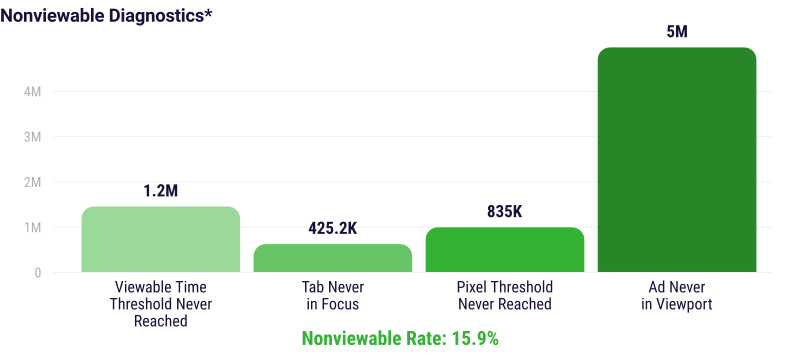
Speed and responsiveness have a high impact on viewability rates. Ads that load faster have a higher viewability rate, and data shows that with every one second of added delay, the viewability rate dropped 3.6% for mobile and 2.9% for desktop traffic. Here are a few tips to help optimize sites and apps to reduce the amount of non-viewable inventory.
Utilize Responsive Page Layouts to Display Viewable Ads on Different Devices
Like responsive ad units above, responsive page layouts can help to reduce latency and promote a positive user experience. The guiding theory is that web page development should reflect user behavior across devices, and consider factors such as screen size and orientation. In practice, these design principles not only help reduce latency for web pages across different devices. They also boost cross-platform audience engagement, which in turn raises viewability rates.
Activate Asynchronous Loading to Reduce Unseen Ads
When web page content loads before ads are rendered on the page, users often scroll away from the ad before it can be seen. To address this, it can be helpful to utilize asynchronous loading for web page and ad content. This means that the ad script does not block any other content on the page from loading. Publishers can use Google Ad Manager (GAM) or other third-party tools to set ads to load separately from other page assets to reduce bottlenecks and decrease page load time.
Optimize Header Bidding Stack
Header bidding is a useful and popular tool in many publishers’ programmatic strategy, but it can also contribute to latency issues. Choosing server-side header bidding over client-side can help reduce this latency because the server handles the auctions and bids instead of the publisher’s website. Other optimizing steps to consider include:
-
Using bidder throttling
-
Implementing a fast wrapper
-
Setting optimal auction timeouts
DV Publisher Suite provides powerful insights on how inventory is perceived by advertisers, including metrics related to viewability, fraud, brand suitability and more. Contact us today to learn more about how we can help teams optimize for viewability.
Related Topics
Recent Posts